SKU: 99006593093

Fume Monitor Badge

Sale price$50.36 Regular price$55.95
Save 10%

Pay in installments of $13.99 with ShopPay, AfterPay and Klarna

Shipping Estimate
USA
  • USA
  • CAN

Ships within 48 hours · Estimated delivery Jul 17 - Jul 22

Promo Codes Available:

For Your Every Summer RSVP, with Code: SUMMER15

Description

Fume Monitor BadgeThe fume monitor can be worn as a badge near the breathing zone to measure personal exposure, or placed in a room to measure area concentration. Workplace Exposure Monitoring Measurement of personal exposure is very easy. Clip the monitoring badge near the breathing zone of the worker. Record the start time and the stop time of the test on the pouch of the badge and return it to the laboratory for analysis in the mailer provided. The analysis report

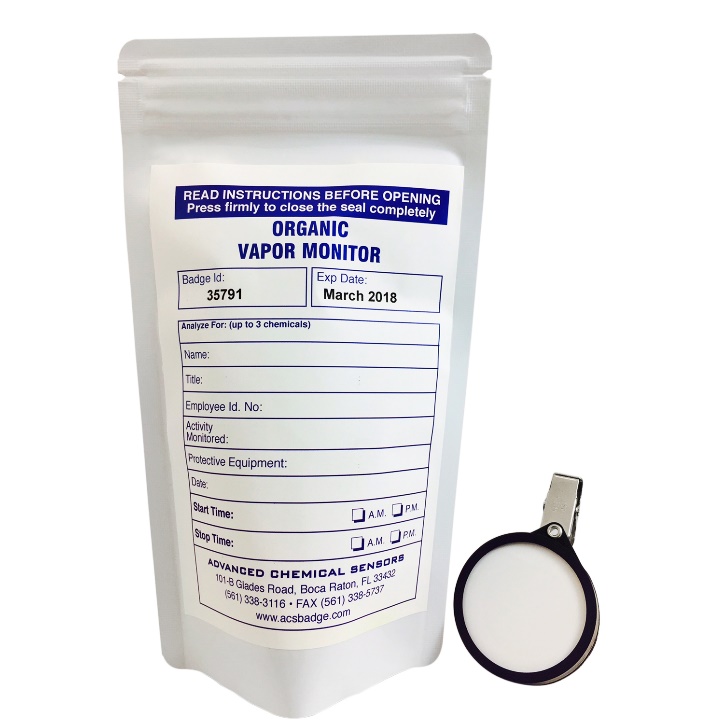
The fume monitor can be worn as a badge near the breathing zone to measure personal exposure, or placed in a room to measure area concentration.

Workplace Exposure Monitoring

Measurement of personal exposure is very easy. Clip the monitoring badge near the breathing zone of the worker. Record the start time and the stop time of the test on the pouch of the badge and return it to the laboratory for analysis in the mailer provided. The analysis report will show the average concentration of the worker’s personal exposure level.

According to OSHA regulations, each person who uses a toxic gas as a regular part of their job must have their exposure monitored periodically.

Indoor Air Monitoring

Leave the badge in the area at least 5 ft off the floor for 24 hours. No need to hire expensive consultants. Record the start and stop times and send the badge back to the laboratory for analysis in the mailer provided. The analysis report explains if the concentration level of your home is exceeding the exposure limit. 

Principle of Operation

Air diffuses through a micro-porous membrane and collects vapor on specially prepared adsorbents inside the monitoring badge.


How it Works

Our monitors are available in the form of “badges” that are worn by the employee during a sampling period. There’s no liquid or metal mechanics involved in our badge sampling, so the process is not cumbersome at all.

As for how the badge works, there is a microporous membrane that chemical vapors pass through. Under the membrane are special adsorbents that collect the vapors at a fixed rate. Our badges meet and exceed OSHA requirements, and OSHA/NIOSH validated methods are used in ACS’s AIHA-LAP, LLC-accredited laboratory.

Our badges:

  • Cost less.
  • Don’t need training.
  • Don’t interfere with a worker’s activities.
  • Test indoor air and personal exposure to toxic chemicals.

Here’s how personal exposure in the workplace is tested using our monitoring badges:

Step 1: Expose the badge

Workers clip the badge in or near a breathing zone, most likely on their person, to measure their personal exposure level to certain chemicals. Badges can be placed in rooms to measure the concentration of chemicals in the air. When clipped on a person, the badge is small and lightweight enough to not interfere with worker activities.

Step 2: Record Start Time and Stop Time

Record the requested information on the outside of the pouch that will enclose the badge after testing is complete. The required information includes the start time and stop time of testing.

Step 3: Return the Badge for Analysis

  • Fast Turnaround Time
  • Reliable Results
  • Tested in an AIHA-LLP, LLC Accredited Laboratory
  • The Lab is NY ELAP Accredited

When the test is finished, put the badge back into the pouch, make sure the ziplock is completely sealed, and mail it back to our lab for analysis. Our normal turnaround time is 72 hours after samples have been received.  Some chemical analysis may take longer than 72 hours.  Reports can be emailed, faxed, or mailed.
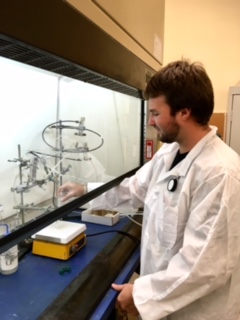
Workers can clip the badge near the breathing zone to measure person exposure level or place it in a room to measure area concentration.  Badges are small and lightweight and do not obstruct the worker activities.

For Testing Indoor Air Quality or Area Monitoring

Simply leave the badge in the area for 24 hours.

To test indoor air quality of your lab, leave the badge in the area at least 5 ft off the floor for 24 hours.  No need to hire expensive consultants.

OSHA
NIOSH ACGIH
TWA (ppm) 0.75 0.016  
STEL/CEIL (ppm) 2  C 0.1 (15 min)  C 0.3


AKA  
 CAS#  50-00-0
 Analytical Method NIOSH 2016
Absorbent  Silica coated with DNPH
Minimum Level of Quantitation 0.01 PPM for 8 Hours
0.3 PPM for 15 Minutes
0.002 PPM for 24 Hours
 Recommended Sampling Time  Workplace: 15 minutes to 8 hours
Indoor Air: 24 hours – 48 hours
 Interferences  No interferences are known
 Effect of Temperature  Less than 10% for each 10°C variation from 24°C
 Effect of Humidity  No effects detected at 30% RH to 92% RH.
 Accuracy  Meets or exceeds OSHA accuracy requirements of +/- 25%
 Storage Conditions  Store at room temperature.
 Recommended Holding Time Monitors need to be returned to Lab within two weeks after sampling.
Shipping Notes
  • Free Standard Shipping on $100+ Orders to the USA.
  • Except Preorder products are shipped in 48 hours.
  • Delivery to the USA:
  1. Standard Shipping : 3-10 business days
  • If time is of the essence, please consider selecting expedited delivery for faster service.
Exchange/Return Notes
  • We offer a 30-day return/exchange service after receiving.
  • Final sale items are not eligible for returns or exchanges.
  • To process your return/exchange, please contact us at [email protected]
  • Please click here for more details>>> Return & Exchange Policy
SKU: 99006593093

Discover Niche Categories That Outsell

Top-Converting Item to Boost Your Average Order

4.2 ★★★★★
Based on 13 reviews
Sort
Highest Rating
Newest First
Oldest First
Product Reviews
A
Amazon Customer
Massapequa, US
★★★★★ 5
Well Designed, Prints Clearly and Accurately, Software is a Bit of a Pain To Set Up
I've never used a printer in my entire life that didn't use finicky ink cartridges that are almost more expensive than the printer itself and need to be constantly replaced; this is a breath of fresh air, despite the dangers of spilling ink and making a mess. I found filling this with ink to be really easy, since you only have to pout the ink bottle in the correct port and leave it to fill itself, which takes about 10-15 seconds. the included ink bottles really only give you enough for a complete fill: You fill it, the printer set up charges the printer with ink, and the remaining ink in the bottles can refill about to the "max" line. Still, I really like this method. The top of the printer pops open like the hood of a car, to access the filling ports. It then has to be lowered down in two stages, presumably to prevent dropping the lid on fingers, though it doesn't seem heavy enough to cause major damage to adult fingers, and I have the printer elevated away from little fingers. This thing has the tiniest little LCD screen! It's a bit tricky on the Epson website to determine which software you need specifically. Obviously, my goal is to have a wireless printer for the entire home network. Some of the software seems specifically web-based, so you could theoretically print from work to a home printer, etc., though I balked at setting up or using an email address to send print jobs to. The wireless was annoyingly tricky to set up. I am still not sure if you're supposed to connect a computer and the printer to the wifi separately, or the printer first and then the computer would automatically recognize it, or what. I did successfully connect the printer to the wifi, but couldn't install some of the Epson software - it kept failing - but a quick test did allow me to print wirelessly, so I decided to just call it good and be done. Everything I have printed has been very clear and crisp. It could be a little darker and have more contrast, but that may be how I printed, or printing from pdf. It printed without jamming or sticking, and everything came through quickly and accurately, without leaks or streaks on my paper. I haven't tried the photocopier function though, since I mainly need it for printing and not scanning.
WAS THIS REVIEW HELPFUL?YesReportShare
Reviewed in the United States on June 13, 2026
D
Dionne
Birmingham, US
★★★★★ 3
No automatic double sided. Bulky external paper tray
Set up was easy. I didn’t like the exterior paper storage. The whole printer was slick and stealthy until it got to that obnoxious tray. Set up was easy. Printer does not have automatic duplex capabilities you have to manually flip the paper to do double sided. I also didn’t think the printing quality was great.
WAS THIS REVIEW HELPFUL?YesReportShare
Reviewed in the United States on June 10, 2026
R
ReViewER
Pawtucket, US
★★★★★ 5
Sorry, Brother. Epson smashed you.
I have been a long time Epson user. I have owned their printers, all-in-ones, movie projectors, and even a receipt scanner. In all cases, I have always found them to be the best performance per dollar of any of the big guys. There kind of like Panasonic in cameras where people may talk about some other big names, but what you get per dollar is always good from them. Somewhere along the way, I got disillusioned with companies charging me $60 per pack of ink. I'd get really mad when I couldn't print black text because red or something was out. For a few years, I gave up and just went black and white laser printer. The toner was dirt cheap, and my printing cost dropped to virtually nothing. But, my ability to pront pictures was gone. No more color at all. I'd have to go to a print business if I needed color copies. Well, this finally changed that. The EcoTank is a great design. The "Eco" stands for the economic cheap ink it takes, and the "Tank" refers to the big holding tanks for the ink and give long ink life. Epson probably makes the best ink, but many manufacturers sell inks for this printer. There's none of the stupid compatability issues with cartridges. It's 2026, so of course it all connects wirelessly over WiFi. It's wonderful. The only issue is that you might have to do a little more maintenance to keep it reliable. If you let old ink carts sit too long, you could just replace them. Here that isn't an option. I've seen Youtube recommendations that say you should probably print a color page every week or two, so factor that in to keep it running well. I love it. Five stars.
WAS THIS REVIEW HELPFUL?YesReportShare
Reviewed in the United States on June 8, 2026
J
JoyinFL
Battle Creek, US
★★★★★ 5
Solid Printer for Regular Use
I ordered this Epson EcoTank ET-2903 because I wanted a printer that did not make me feel held hostage by tiny ink cartridges. The refillable tank system is the main reason this printer stands out. Being able to see the ink levels on the front and refill from bottles makes the whole process feel less wasteful and less stressful. Setup was straightforward. Filling the ink tanks was easier than I expected because the bottles are keyed to the right color, so you are not guessing where each one goes. I did not have a mess during setup, and that was my biggest concern with a tank printer. Print quality is strong for normal home and office use. Black text comes out clean and easy to read, and color prints are bright enough for school projects, labels, recipes, forms, and casual photo printing. It is not the fastest printer I have ever used, but the tradeoff is lower ink stress and better long-term value. The wireless printing is convenient once it is connected. I like being able to print from my phone or laptop without moving files around. The scanner and copier are also useful for everyday paperwork, receipts, and documents. A couple practical notes: this is a rear-feed paper tray style printer, so plan where you are putting it because it needs some clearance. Also, it does not automatically print double-sided, so duplex printing takes a manual flip. For value, the ink tank system is what makes this worth it. If you print regularly and are tired of buying cartridges, this is a smart home office upgrade.
WAS THIS REVIEW HELPFUL?YesReportShare
Reviewed in the United States on June 12, 2026
P
Pathune
San Leandro, US
★★★★★ 5
Epson EcoTank ET-2903
Epson ecotank are great replacements for standard printers. The fact that you get to use the ink bottles rather than the rip off ink cartridges that only last a little while is an amazing benefit. They print well and have a good print quality, so much so that we have one for normal printing and one for sublimation printing. I do all my printing wireless and have the rate occurrence that it has connectivity issues, like all printers. It holds a good amount of paper making refills less often Than the cheaper printers. To me it has been perfect for my small home business.
WAS THIS REVIEW HELPFUL?YesReportShare
Reviewed in the United States on June 12, 2026

recommand products